
Need help with Seeburg V3WA Wallbox
Q&A about all types of jukeboxes: Wurlitzer, Seeburg, Rock-Ola, AMI, and more.
-
highriverguy
Topic author - Junior Member
- Posts: 5
- Joined: Tue Aug 30, 2016 5:58 pm
- Location: Nr Calgary Alberta Canada
I am trying to restore my wall box and I am new to this never did one before . I bought a 25V transformer and connected it up I put a quarter into the machine and it took it I tried pushing the buttons but they will not push only the bottom row(numbers only) will push in. Some of my lights work and some do not. The arm on the selector plate moves to the next dot but that is it. So it seems it is not getting power somewhere Any suggestions out there?
- Attachments
-
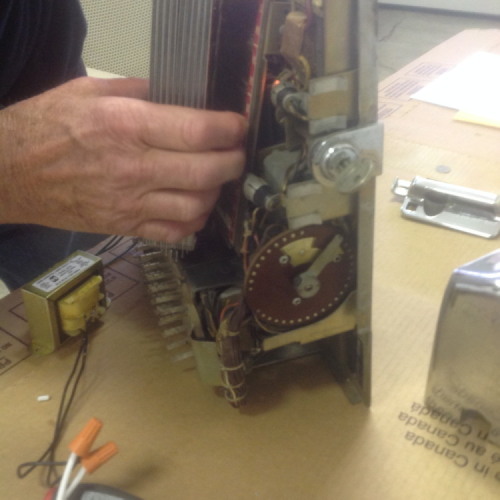
- IMG_0459.JPG (64.45 KiB) Viewed 173 times
-
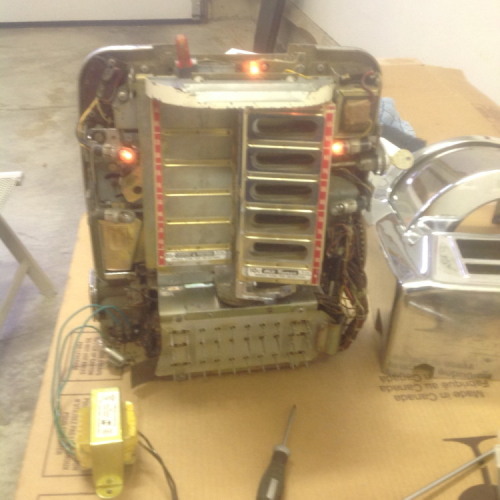
- IMG_0458.JPG (72.09 KiB) Viewed 173 times
-
Ron Rich
- Forum Moderator
- Posts: 8193
- Joined: Sun May 06, 2007 11:31 pm
- Location: Millbrae (San Francisco area)CA, USA
Do you have a service manual for it--they published a real nice one for that model--If you don't have one, I suggest you not "do anything" until after obtaining, and reading it. Just in case you are not aware of it, there is a list of parts/book suppliers, above this post, in the jukebox section of this forum. Ron Rich
highriverguy wrote:I am trying to restore my wall box and I am new to this never did one before . I bought a 25V transformer and connected it up I put a quarter into the machine and it took it I tried pushing the buttons but they will not push only the bottom row(numbers only) will push in. Some of my lights work and some do not. The arm on the selector plate moves to the next dot but that is it. So it seems it is not getting power somewhere Any suggestions out there?
"High" Yeah, I have some suggestions;
First, a question; why are there three wires going to the transformer? There should only connection to the orange -chassis and green -AC input. the third is blue-signal and not needed at this time.
Next, it is item to oil the motor and gears before doing anything further. Use a good 20wt and be sure to put a drop on all cam faces as well.
-When credited the wiper blade should form a "V" as shown here:
http://s1192.photobucket.com/user/Rob-N ... rt=2&o=230 In this position the buttons should lock in when pressed. the wiper blade should not be able to be turned counter-clockwise in this position.

Failure to launch when both buttons are pressed can be caused by the following:
-Some letter groups being in the "EP's" bus on the and not enough credits to permit a start. Check the taper pins on the terminals right above the credit unit.
-Dirty or pitted contact fields on the credit wheel. If the box is stepping up to credit position this probably isn't a problem. A shot of contact cleaner is a good idea here.
-Pitted or misadjusted Blades on the stack right behind the signal wafer:
http://s1192.photobucket.com/user/Rob-N ... rt=2&o=233 Note that there are (at least) three different configurations of these boxes internally and the switch stack also looks different in each case. In general, when credited the set of blades with one long inside two shorter ones must not be touching either one.

-Pitted or misadjusted treadle bar start switches:
http://s1192.photobucket.com/user/Rob-N ... rt=2&o=232 These are under a removable cover at the top and bottom of the keyboard assembly. They must close with a bit of wiping (overtravel). Try pressing both letter and number simultaneously.

-The inability to get the letter or number keys to press in may be a lack of lubrication on the sliding spline that locks buttons in, try a little spray silicone injected into the keyboard assembly. Also check the positions of these screws; http://s1192.photobucket.com/user/Rob-N ... rt=2&o=232 Wear on the cam that operates this linkage can cause the release screws not to be far enough inward to allow buttons to be pressed and stay locked-in. When the motor is running and box is "sending" this linkage moves outward thus locking in the buttons and not permitting any change to be made.
i have 93 of these old relics on location. In all cases they were washed with diluted floor stripper, rinsed in warm water and a vacuum was used as a blower to get most of the water out. This was followed by being placed a few inches above a radiator or out in the sun for a few hours and allowing an additional day to make sure the coils are dry.
Re-soldering the sockets and modifying the credit setup is also done.
Rob-NYC
"If we believe absurdities, we shall commit atrocities" -- Voltaire
-
highriverguy
Topic author - Junior Member
- Posts: 5
- Joined: Tue Aug 30, 2016 5:58 pm
- Location: Nr Calgary Alberta Canada
Thanks Rob and Rich for all your advice I will go back "to the drawing board" and go over the list you gave me The third wire going to the transformer is the ground wire
-
Ron Rich
- Forum Moderator
- Posts: 8193
- Joined: Sun May 06, 2007 11:31 pm
- Location: Millbrae (San Francisco area)CA, USA
On the transformer-- the AC hot goes to the green terminal--the AC return to the orange terminal ( ground screw)--the "blue/signal" terminal should be vacant, when using an external transformer to power the WOM.
Ron Rich
Ron Rich
-
highriverguy
Topic author - Junior Member
- Posts: 5
- Joined: Tue Aug 30, 2016 5:58 pm
- Location: Nr Calgary Alberta Canada
Rob I am going to try what you suggest Do I have to tear the keyboard right apart or can I leave as is and lubricate that way I guess I am afraid of lubricating something that I should not be doing
"Guy", you don't take anything apart to lube the box.
There are gears to the left of the motor that need a drop or two of oil as well as on their shafts. The motor shaft needs a drop on both left and right sides. There are also gears behind the wafer and these can be hard to get to but use a "zoom spout" type hose oiler to snake between the wires. The same oiler is used to put a drop on the can faces and the splines that goes through the keyboard from left to right.
A bit of spray contact cleaner and lubricant can be applied to the inside of the keyboard sections when the cashbox is removed.
Rob
There are gears to the left of the motor that need a drop or two of oil as well as on their shafts. The motor shaft needs a drop on both left and right sides. There are also gears behind the wafer and these can be hard to get to but use a "zoom spout" type hose oiler to snake between the wires. The same oiler is used to put a drop on the can faces and the splines that goes through the keyboard from left to right.
A bit of spray contact cleaner and lubricant can be applied to the inside of the keyboard sections when the cashbox is removed.
Rob
"If we believe absurdities, we shall commit atrocities" -- Voltaire
-
Ron Rich
- Forum Moderator
- Posts: 8193
- Joined: Sun May 06, 2007 11:31 pm
- Location: Millbrae (San Francisco area)CA, USA
Guys,
I agree with Rob on this with a slight exception--"spraying" the keyboard, IMHO is not a good idea, as most "lubes" will conduct electricity--a REAL "no-no" on the Seeburg TES
models ! A pin point oiler, such as a Valve Spout, or Zoom Spout, is preferable. I strongly suggest 20 wt, ND oil be used at all/any "pivot points", and any points that are metal to metal turning areas. On areas that are metal to metal "sliding" (scraping) areas, I suggest a small dab of graphite grease. Ron Rich
I agree with Rob on this with a slight exception--"spraying" the keyboard, IMHO is not a good idea, as most "lubes" will conduct electricity--a REAL "no-no" on the Seeburg TES
models ! A pin point oiler, such as a Valve Spout, or Zoom Spout, is preferable. I strongly suggest 20 wt, ND oil be used at all/any "pivot points", and any points that are metal to metal turning areas. On areas that are metal to metal "sliding" (scraping) areas, I suggest a small dab of graphite grease. Ron Rich
Ron, to be clear about the keyboards & lube, what I have used for the past 30+ years are products specifically intended for contacts in electronics equipment such as those made by Caig, CRC and one sold by Radio Shack.
I'd also caution against using graphite in these keyboards as this can become conductive especially in these high impedance circuits. Graphite is right for sliding surfaces such as the keyboard shafts and locking spline as long as it is kept out of the contacts.
I've never tried to put a wallbox back in service without first washing it so I can't attest as to how effective contact cleaners alone will be in restoring these keyboards.
Rob
I'd also caution against using graphite in these keyboards as this can become conductive especially in these high impedance circuits. Graphite is right for sliding surfaces such as the keyboard shafts and locking spline as long as it is kept out of the contacts.
I've never tried to put a wallbox back in service without first washing it so I can't attest as to how effective contact cleaners alone will be in restoring these keyboards.
Rob
"If we believe absurdities, we shall commit atrocities" -- Voltaire
-
Ron Rich
- Forum Moderator
- Posts: 8193
- Joined: Sun May 06, 2007 11:31 pm
- Location: Millbrae (San Francisco area)CA, USA
Hi Rob,
Yep--sometimes a spray in the wallbox keyboards is fine--but cautions such as using a product that's "Plastic Safe", and non-conductive, make it difficult for me to advise using them--they can be as conductive as graphite grease ( that's why I said a "SMALL DAB"--) Ron Rich
Yep--sometimes a spray in the wallbox keyboards is fine--but cautions such as using a product that's "Plastic Safe", and non-conductive, make it difficult for me to advise using them--they can be as conductive as graphite grease ( that's why I said a "SMALL DAB"--)
Ron RichWho is online
Users browsing this forum: Google Adsense [Bot] and 12 guests
It is currently Thu Oct 06, 2016 6:31 am