The new design looks horrible on my computer. It never ceases to amaze me that something works great and somebody just has to screw it up,
Edwin

New Design
The lounge where a collector can relax. For topics that don't fit into the forums.
-
 DoghouseRiley
- Senior Member
- Posts: 630
- Joined: Thu Apr 16, 2009 9:48 pm
- Location: North-West England
One thing I've learned having contributed to many message boards over the years (including this one) , is not to knock the people who go to the trouble of providing the facility. There's no percentage i it.
In truth, I was quite happy with the old board, It did look a bit dated, but then that's the sort of stuff that the board was all about, so for me it was quite acceptable
But I ain't gonna criticise this one. It's different yes, but I've told myself I'll get used to it.
On some boards you have the opportunity of choosing the background.
______________________________________________________________________________________________________
I don't mind if you don't like my manners, I don't like them myself, they're pretty bad, I grieve over them on long winter evenings.
-
 MattTech
- Senior Member
- Posts: 1461
- Joined: Tue Apr 29, 2008 7:38 am
- Location: Philadelphia Pa USA - Home Electronics - Service Technician
The old "look" was fine, I didn't have issue with it.
This "new" look is also nice, and as Marcel stated it's "clean" and simple.
I'm all about keeping things simple and manageable.
The only thing that ever bugged me, and it was just a temporary passing thing was during the Christmas holidays when they put that "snow" effect coming down all over my screen.
It was kinda distracting, trying to read through that blizzard......HAHAHA!
This "new" look is also nice, and as Marcel stated it's "clean" and simple.
I'm all about keeping things simple and manageable.
The only thing that ever bugged me, and it was just a temporary passing thing was during the Christmas holidays when they put that "snow" effect coming down all over my screen.
It was kinda distracting, trying to read through that blizzard......HAHAHA!
The Internet is a marvelous thing, however it's not a good substitute for actually being there.
I must admit I am not overjoyed with the new look, it is a pain to search out what to do now, before it was just second nature.
Regards
Alan
Alan Hood
ami-man
UK
Regards
Alan
Alan Hood
ami-man
UK
-
Joe_DS
- Forum Moderator
- Posts: 1056
- Joined: Thu Jun 08, 2006 4:23 pm
- Location: San Francisco, California, USA
I've moved this post string to the Collector's Lounge, since it pertains to the use of the board, and not Jukeboxes, specifically.
RE:
Not a screw up, but a move to a more secure, and believe it or not, more streamlined and simplified platform that will work as well on PCs as it will on hand held devices.
It's always frustrating, though, to have to relearn things we've done by rote for years. For instance, it took me awhile to find out how to go about doing the basic tasks I'd mastered using the old format, such as checking for private messages, clearing the list of new posts, etc. But interestingly, now I'm doing those things by rote using the new interface.
Along this line, if you have specific "how do I" questions, please post them here, in Collector's Lounge, and the moderators (and, perhaps, members) can offer assistance.
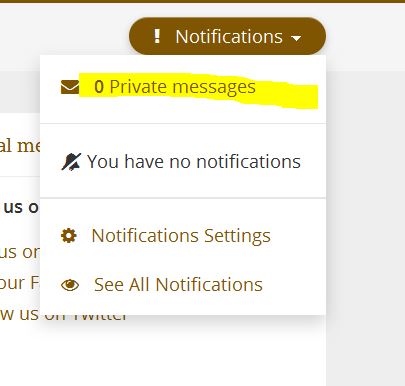
As one example, if you ask, how do I access the private messages page, instructions along with a simple screen capture image could be provided:
--) Click on Notifications, under your user name at the left-hand top of the screen, and then click on private messages listed at the top of the drop-down list:
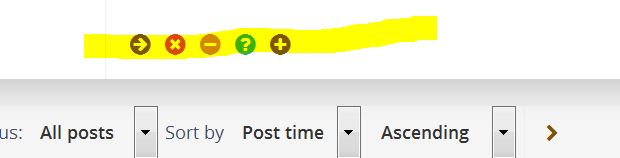
Another example, to edit, delete, report, reply with quotations, etc. to posts, hover your mouse over the small icons that appear at the bottom of posts --
--you'll see a small text pop-up for each icon telling you what it does when you click on it.
Hope this helps.
Joe
RE:
The new design looks horrible on my computer. It never ceases to amaze me that something works great and somebody just has to screw it up,
Edwin
Not a screw up, but a move to a more secure, and believe it or not, more streamlined and simplified platform that will work as well on PCs as it will on hand held devices.
It's always frustrating, though, to have to relearn things we've done by rote for years. For instance, it took me awhile to find out how to go about doing the basic tasks I'd mastered using the old format, such as checking for private messages, clearing the list of new posts, etc. But interestingly, now I'm doing those things by rote using the new interface.
Along this line, if you have specific "how do I" questions, please post them here, in Collector's Lounge, and the moderators (and, perhaps, members) can offer assistance.
As one example, if you ask, how do I access the private messages page, instructions along with a simple screen capture image could be provided:
--) Click on Notifications, under your user name at the left-hand top of the screen, and then click on private messages listed at the top of the drop-down list:
- 1Capture.JPG (26.16 KiB) Viewed 1510 times
Another example, to edit, delete, report, reply with quotations, etc. to posts, hover your mouse over the small icons that appear at the bottom of posts --
- 3Capture.JPG (17.82 KiB) Viewed 1508 times
--you'll see a small text pop-up for each icon telling you what it does when you click on it.
Hope this helps.
Joe

Thanks Joe_DS for the clear screenshots!
From my end I would like to emphasize that the main reason for the change in the lay-out is that the old one needed to be rewritten all over because of a new version of the forum software (phpBB).
As posted earlier in this thread, the old layout was getting outdated, so I took this opportunity to implement a more modern layout (also for smartphone and tablet) to meet modern standards while keeping a light weight and easy interface.
I understand the critisism: I myself don't like websites I visit regulary suddenly change layout, but usually I get used to it sooner then I expect myself I hope this will be the case for our visitors too.
The reason for the forum software update: I always want the software to be updated to the latest version as this has to do with security and flexibility (for example for possible future add-ons to the forum).
Thanks!
From my end I would like to emphasize that the main reason for the change in the lay-out is that the old one needed to be rewritten all over because of a new version of the forum software (phpBB).
As posted earlier in this thread, the old layout was getting outdated, so I took this opportunity to implement a more modern layout (also for smartphone and tablet) to meet modern standards while keeping a light weight and easy interface.
I understand the critisism: I myself don't like websites I visit regulary suddenly change layout, but usually I get used to it sooner then I expect myself
I hope this will be the case for our visitors too.The reason for the forum software update: I always want the software to be updated to the latest version as this has to do with security and flexibility (for example for possible future add-ons to the forum).
Thanks!
-
Las Vegas Jukebox
- Senior Member
- Posts: 241
- Joined: Wed Nov 14, 2012 1:51 am
- Location: Las Vegas, Nevada, USA
The new design is okay, but I wish the effort had gone into improving rather than titivating.
My Private Messages still sit in my Outbox for hours, and then its a 50/50 lottery as to whether they go or not.
My Private Messages still sit in my Outbox for hours, and then its a 50/50 lottery as to whether they go or not.
Regards
Keith
Keith
-
Joe_DS
- Forum Moderator
- Posts: 1056
- Joined: Thu Jun 08, 2006 4:23 pm
- Location: San Francisco, California, USA
Las Vegas Jukebox wrote:The new design is okay, but I wish the effort had gone into improving rather than titivating.
My Private Messages still sit in my Outbox for hours, and then its a 50/50 lottery as to whether they go or not.
The way the private messages work is a little different from the way email works. When you send an email message, a copy is immediately put in your "Sent" folder.
For many forums, such as this one, when you send a private message, it stays in your Outbox until the person you sent it to logs onto the forum. At that point, it will be moved from your Outbox to your Sent folder, and the recipient will be notified. If the person is constantly logged in, then it will appear in the Sent folder immediately.
HTH,
Joe
(just as additional info: This worked the same way in the old forum layout too; PM's stay in outbox as explained by Joe_DS. Perhaps the new layout just attracts some extra attention to it).
Who is online
Users browsing this forum: No registered users and 2 guests
It is currently Thu Oct 06, 2016 7:25 am