Page 1 of 1
Rockola 442 Buttons Problem
Posted: Sun Aug 17, 2014 8:54 pm
by Psychman
I've had an ongoing issue with my number buttons, sometimes they need a wiggle once locked in to make the write in motor function. So I decided to remove the keyboard assembly and degrease the numerical button bank. To give you some background some idiot sprayed WD40 over this to "clean" the buttons before I got the machine, So i wanted to get this off expecting this to be the issue. I also took the chance to wash all the buttons and button windows, everything was caked in crap for want of a better word.. After putting it all back together I've got a few issues.
The numerical buttons wont lock in correctly, unless I have this wrong. I had to remve part of the button bank that causes the buttons to lock. I'm not sure of its name, but ive included a picture, where it "locks" i've circled this. I've also labelled the 2 screws that hold it in place, as there is some "adjustment" possible with these.
Basically the problem I now have, is that I can either get this attached so the number buttons lock in EVERY time, regardless of whether a letter is pressed first. Or, I can make it so they dont lock in at all.
From my memory the numbers should only lock in once a letter is locked in? Is there some thing i'm missing here? I keep unscrewing the "bar" that locks the buttons and moving slightly but cannot find a way to get it to lock in ONLY once a letter is pressed.
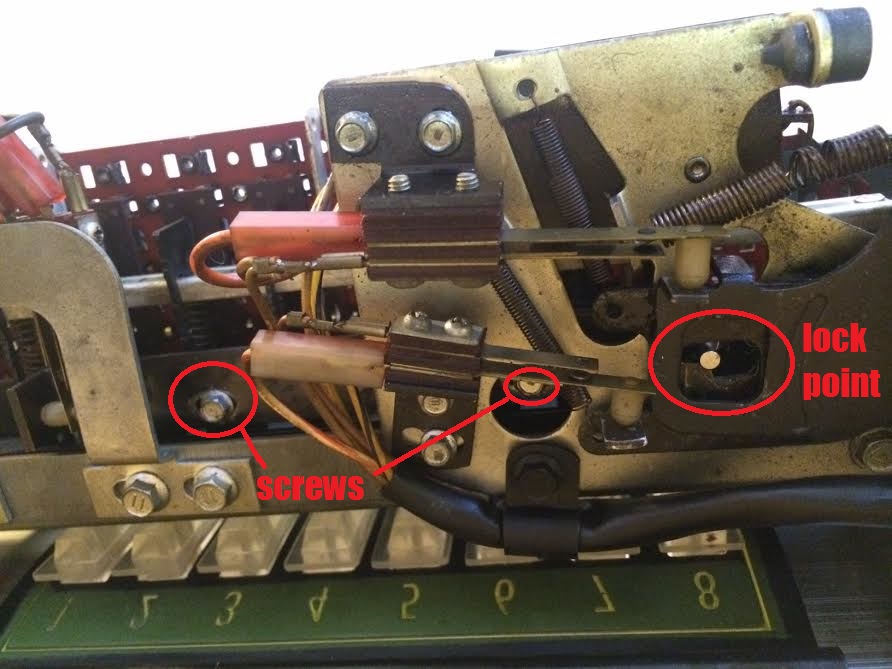
anyway the issue causing me to "wiggle" the buttons seems to be caused by one of the leaf contacts to the right of this picture, so kind of a waste of time removing that button bank

Re: Rockola 442 Buttons Problem
Posted: Sun Aug 17, 2014 11:40 pm
by clones
Hi
I had similar problems with a rockola 445, i removed it and gave it a good clean with Ammonia solution. What i found that when the cabinet lid is raised the numbers would not lock in and when it is closed they would. I tried the adjustments as you outlined but it didn't make any real difference. Also the slightest touch on the main plug connection from the keyboard to the machine, think its the red one could also affect selection, so i guess it needs cleaning
Clones
Re: Rockola 442 Buttons Problem
Posted: Mon Aug 18, 2014 10:03 am
by Psychman
So in your case this was a wiring / plug problem?
Im going to try and remove the keyboard and remount the button bank, there is some movement when thats mounted and at least I can move things above easier and observe what happens.
Other considerations here, I did degrease the button bank, so it moves a little stiffer than it did. I was hesitant to throw oil around, but perhaps the moving parts (not contacts) could use a little oil?
When I press a letter and it locks in, I see something next to the number lock bar pin move. I imagine this is what is supposed to enable the number keys to lock, except it doesnt seem to make any difference right now.
Re: Rockola 442 Buttons Problem
Posted: Mon Aug 18, 2014 4:24 pm
by Ron Rich
Did you check the service manual for an adjustment procedure ? I don't know if it's there or not, but would assume so.
Also,as you stat, a DROP of 20wt. oil on pivot points is considered necessary after cleaning of a keyboard. Graphite based grease on sliding points, was also used by the factory. Ron Rich
Re: Rockola 442 Buttons Problem
Posted: Mon Aug 18, 2014 8:34 pm
by Psychman
Ok, there is an adjustment in the manual but it's not overly clear, infact one part appears upside down!?
Anyway, just to confirm, should the numbers be able to lock in BEFORE a letter is pressed? I honestly cannot remember
Re: Rockola 442 Buttons Problem
Posted: Mon Aug 18, 2014 8:40 pm
by Ron Rich
I would think so--they do on other jukes ??
Ron Rich
Re: Rockola 442 Buttons Problem
Posted: Mon Aug 18, 2014 8:47 pm
by Psychman
OK, well if the number buttons can always lock in first, then I guess I have no issue! I dont think selections work this way but if someone presses a number first, they need to hit reset I suppose!
Frustrating the tiny details you forget once you've dismantled something!! As it is I cannot see anything which would "enable" a number to lock in once a letter was pressed. The only item I see affecting lock in is the latch bar solenoid
Ive oiled the moving parts with good ole SAE20 and its certainly moving better. This oil is indeed damn good stuff for Rockolas!
Re: Rockola 442 Buttons Problem
Posted: Mon Aug 18, 2014 11:23 pm
by DoghouseRiley
I guess I don't take much notice of it with my 443.
As I see it, when you press the letter button it locks.
It won't allow you to press another letter.
When you press a number, it locks momentarily, then you hear the "clunk" of the solenoid as it releases the latch and both buttons return.
Re: Rockola 442 Buttons Problem
Posted: Wed Aug 20, 2014 4:00 pm
by Psychman
Yes pretty normal both can lock first I think. Ive got it all back and working.
Clones, I did find the same issue you had, when the lid was up i got them locking in, then after putting down they stopped.
This seems to be gravity moving the lock bar just enough so it doesnt latch. I found that by loosening the adjustment screws and holding the lock bar at the locking point up AGAINST the part where it locks, then tightening them this was resolved. The manual only really deals with horizontal travel of the bar, but in fact it there is a little vertical adjustment too which can affect locking.
Thankfully after deoxit d5 on a business card with all contacts, and a little careful bending of the leaf contacts to adjust them, the write in process works fine every time. I didnt realise some of these contacts looked gold underneath all that black stuff!