Greetings All!
Hope you are all having a wonderful day. I have a question and wondering if anyone has iny info about it. I would love to turn my microphone input on my Rockola 453 Jukebox into an aux input for use with mp3 player or other such device. I have seen others mention this on google but no one really went into details. They were successfull in doing it but didnt really state what they did. I dont know the wires but have a pdf version of the maunal and schematic of the jukebox. If someone would be able to tell me what the wires go to and what not I think I can figure it out. I am not really sure how to read the wiring diagram. Any help would be appreciated. Thanx you for your time.
Nick.

Microphone input as Aux Rockola 453
Q&A about all types of jukeboxes: Wurlitzer, Seeburg, Rock-Ola, AMI, and more.
-
Ancient Engineer
- Junior Member
- Posts: 8
- Joined: Mon Nov 19, 2012 9:08 pm
Hi,
I don't know the particular Rock-Ola circuit, but there are several ways you could provide a line-level aux input.
Because I'm an electronics engineer, I would probably l just add an internal attenuator pad, which would cost a few cents.
However, I realize that you probably don't want to go poking around inside.
There is a very simple plug-in alternative. You can use what is known in the P.A. industry as a "D.I" box.
The Behringer passive model, 'Ultra -DI600P' would do the job.
This has a 1/4 inch jack input socket, switchable attenuation, and an transformer -isolated output on an XLR-3pin connector.
They are fairly cheap, (around £20 here in the U.K.).
All you would need to do is plug your mp3/media player into the 1/4 inch input, make up a lead for the output, using an XLR 3 pin line socket, to whatever the connector type is on the Rock-Ola, and away you go.
You can purchase a ready-made lead if you don't want to wield a soldering iron. (They are available as a microphone to unbalanced jack lead).
Hope that helps,
Dave.
I don't know the particular Rock-Ola circuit, but there are several ways you could provide a line-level aux input.
Because I'm an electronics engineer, I would probably l just add an internal attenuator pad, which would cost a few cents.
However, I realize that you probably don't want to go poking around inside.
There is a very simple plug-in alternative. You can use what is known in the P.A. industry as a "D.I" box.
The Behringer passive model, 'Ultra -DI600P' would do the job.
This has a 1/4 inch jack input socket, switchable attenuation, and an transformer -isolated output on an XLR-3pin connector.
They are fairly cheap, (around £20 here in the U.K.).
All you would need to do is plug your mp3/media player into the 1/4 inch input, make up a lead for the output, using an XLR 3 pin line socket, to whatever the connector type is on the Rock-Ola, and away you go.
You can purchase a ready-made lead if you don't want to wield a soldering iron. (They are available as a microphone to unbalanced jack lead).
Hope that helps,
Dave.
Nicholas, Dave, if you look at this circuit here:
http://www.verntisdale.com/schem/453-54a.JPG
and
http://www.verntisdale.com/schem/453-54.JPG
the built-in Mic-in comes in after the volume and tone controls (typical).
The "ins" would be Pins 2&3 on that plug with Pin 1 or a direct chassis connection as ground.
The only oddball here is a connection to the mute relay circuit. I assume this mutes the phono signal when the mic's 'talk" button is pressed. You can probably ignore this, but it will mean that the mic is mixed with any record that might be playing.
The first stage of the driver appears to want a a 180mv as average so any normal mic pre should be adequate. The only remaining question is what effect the new preamp's circuit will have on the juke's phono stages. It might significantly lower the gain and/or alter the response due to it's loading. I wonder of R-O's kit had a relay to disconnect it when the mic button was not pressed.
Rob
http://www.verntisdale.com/schem/453-54a.JPG
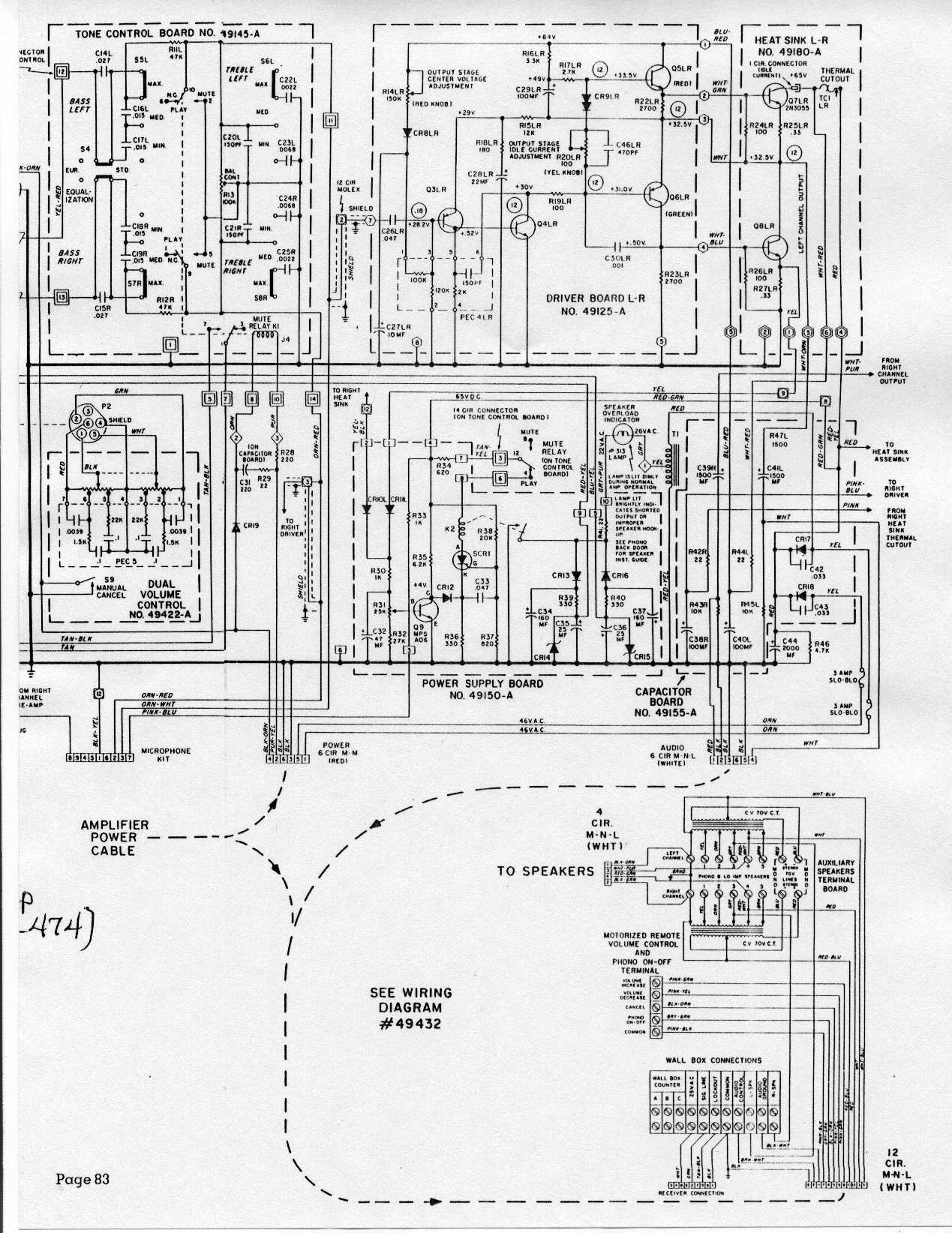
and
http://www.verntisdale.com/schem/453-54.JPG
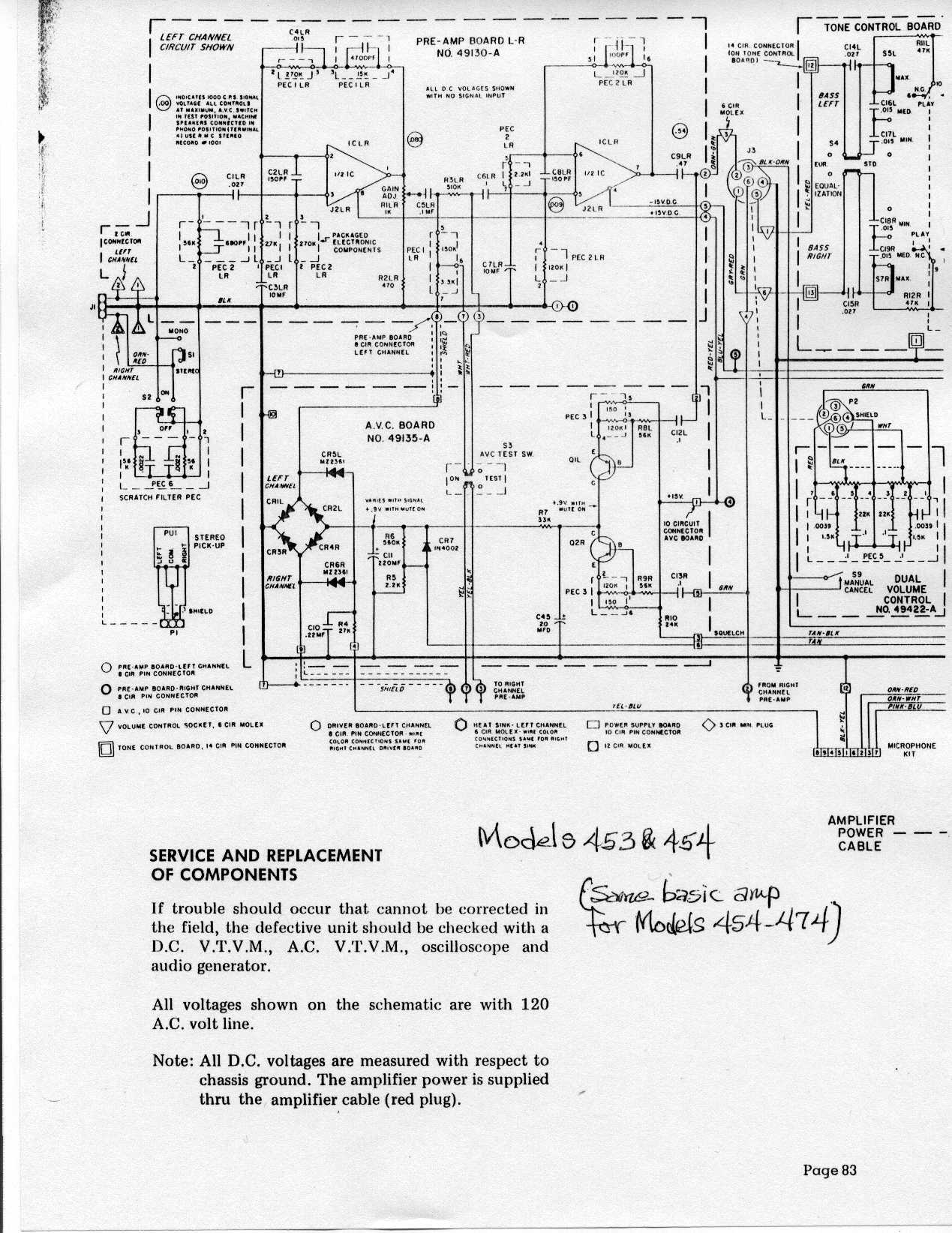
the built-in Mic-in comes in after the volume and tone controls (typical).
The "ins" would be Pins 2&3 on that plug with Pin 1 or a direct chassis connection as ground.
The only oddball here is a connection to the mute relay circuit. I assume this mutes the phono signal when the mic's 'talk" button is pressed. You can probably ignore this, but it will mean that the mic is mixed with any record that might be playing.
The first stage of the driver appears to want a a 180mv as average so any normal mic pre should be adequate. The only remaining question is what effect the new preamp's circuit will have on the juke's phono stages. It might significantly lower the gain and/or alter the response due to it's loading. I wonder of R-O's kit had a relay to disconnect it when the mic button was not pressed.
Rob
"If we believe absurdities, we shall commit atrocities" -- Voltaire
-
Nicholas
Topic author - Junior Member
- Posts: 19
- Joined: Wed May 25, 2011 9:12 pm
- Location: Kenosha, WI
Hello! Thank you all for your help. This is exactly what I was hoping to gain as information. I am quite handy when it comes to hooking things up; I just have no idea where to start with the wires and where they go and things like that. Those maps are like a foreign language to me. Now that I know what goes to what I will be able to hook something up. I just needed to have it explained to me and I can figure it out. As for the muting process I wont have an issue with that as If I'm playting a record I wont have the mp3 player, playing anything. I just want it so I can use the jukebox more when I have parties. Everyone loves to pump it full of quarters at my house when I have a party. But you can only hear the records in it so many times.  Rob and Dave, thank you both so much! It really means alot to me. I will keep you all informed with the process. Thank you for your time!
Nick.
Rob and Dave, thank you both so much! It really means alot to me. I will keep you all informed with the process. Thank you for your time!Nick.
-
Nicholas
Topic author - Junior Member
- Posts: 19
- Joined: Wed May 25, 2011 9:12 pm
- Location: Kenosha, WI
Ok. I was rather shocked to find out that it worked. I can now use my Rockola 453 Jukebox to play its records, and now serve as an mp3 player for whatever device I choose to hook up to it. Once Rob gave me the colors of the wires, what they were and those diagrams, I was able to figire out the numbering pattern for the mic input on the Jukebox. Hooked wires up to them, and it worked instantly. Of course all this is done with the power off.
You only need two things to do it too, one is an old stereo headphone jack; and the plug-in part of a molex connector, not the socket part. You rip apart the molex plug and take three of the pins out, wires and all; (These will be what you use to stick into the Jukeboxes microphone input) now strip all three wire ends.
Next cut the headphone cord to whatever length you wish; sprip the wire ends.
Now you will need to figure out which headphone wire went to what channel. What I did to determine this is I took a rather small speaker and played a song through the mp3 player and put each wire end to the speakers terminals to see what went to what. Make sure you use a song that you know has different sounds on each channel. My headphone cord had a blue, red, and a green wire. The red was right, green was left, and blue was the negitive.
Connect the three wire ends to the molex pin wires and put electricians tape around each end. There are nine pins on the Jukebox microphone input, the top three are 1,2,3. Those are all you will need. Now take the molex pins and insert them into the Jukebox's microphone input socket. Number one is your negitive, and two and three are your right and left channels. Wrap any exposed pin you see with electricians tape just in case, if you did it right you wont even need to use any tape as the wires will not touch using the molex pins, as they are a perfect snug fit! Thats all you have to do and you can bring your jukebox more into the future. It even mutes itself when you have the mp3 player connected automatically. One thing though is that the volume control on the Jukebox itself is totally useless. You have no choice but to control the volume form your mp3 player or whatever you are using. Trust me it is just as loud as the records, and sounds as good. I have no weird noises or hums or anything. Works totally flawlessley. I'm sure anyone who has a Rockola jukebox from the seventies will be able to do this to their jukebox, as long as it has a microphone input. If anyone has any questions, feel free to ask me. Hope this can help someone else out too.
Nick.
You only need two things to do it too, one is an old stereo headphone jack; and the plug-in part of a molex connector, not the socket part. You rip apart the molex plug and take three of the pins out, wires and all; (These will be what you use to stick into the Jukeboxes microphone input) now strip all three wire ends.
Next cut the headphone cord to whatever length you wish; sprip the wire ends.
Now you will need to figure out which headphone wire went to what channel. What I did to determine this is I took a rather small speaker and played a song through the mp3 player and put each wire end to the speakers terminals to see what went to what. Make sure you use a song that you know has different sounds on each channel. My headphone cord had a blue, red, and a green wire. The red was right, green was left, and blue was the negitive.
Connect the three wire ends to the molex pin wires and put electricians tape around each end. There are nine pins on the Jukebox microphone input, the top three are 1,2,3. Those are all you will need. Now take the molex pins and insert them into the Jukebox's microphone input socket. Number one is your negitive, and two and three are your right and left channels. Wrap any exposed pin you see with electricians tape just in case, if you did it right you wont even need to use any tape as the wires will not touch using the molex pins, as they are a perfect snug fit! Thats all you have to do and you can bring your jukebox more into the future. It even mutes itself when you have the mp3 player connected automatically. One thing though is that the volume control on the Jukebox itself is totally useless. You have no choice but to control the volume form your mp3 player or whatever you are using. Trust me it is just as loud as the records, and sounds as good. I have no weird noises or hums or anything. Works totally flawlessley. I'm sure anyone who has a Rockola jukebox from the seventies will be able to do this to their jukebox, as long as it has a microphone input. If anyone has any questions, feel free to ask me. Hope this can help someone else out too.
Nick.
Who is online
Users browsing this forum: Google Adsense [Bot], Juke-rocks and 8 guests
It is currently Thu Oct 06, 2016 2:07 pm