Titlestrips..

Q&A about all types of jukeboxes: Wurlitzer, Seeburg, Rock-Ola, AMI, and more.


User avatar

Topic author
foxtrotxray
Senior Member
Posts: 117
Joined: Sat May 16, 2015 8:49 pm
Location: West Virginia, US

Titlestrips..

by foxtrotxray » Wed Jun 17, 2015 5:55 pm

I'm familiar with the free (and paid) titlestrip websites out there, and recently as I was trying them out, I got agitated by them. Specifically the lack of centering (my OCD had a field day with this..!), lack of being able to select styles/colors on record (instead all pages have the same color/style), entering more than 20, properly right-justifying label text, and not letting text run OUTSIDE of the strip..

This is an example of the lack of centering that drove me crazy:

Image

So, as I program web-based applications and interactive websites for a living, I figured I could do it better myself. I know SVG (vector art format), so for the last four months, about 10 hours a week on my daily commute to my office, I've been working on a website where I could enter my record info in, and select which ones I get titlestrips for.

At first, it didn't have a real good UI (and frankly, while it looks messy to you now, with things not lined up or centered, it was a LOT worse before), and I wanted to change some stuff around, so at this time, I ended up with this.

Here's a screen showing all the 45's I have in the system:
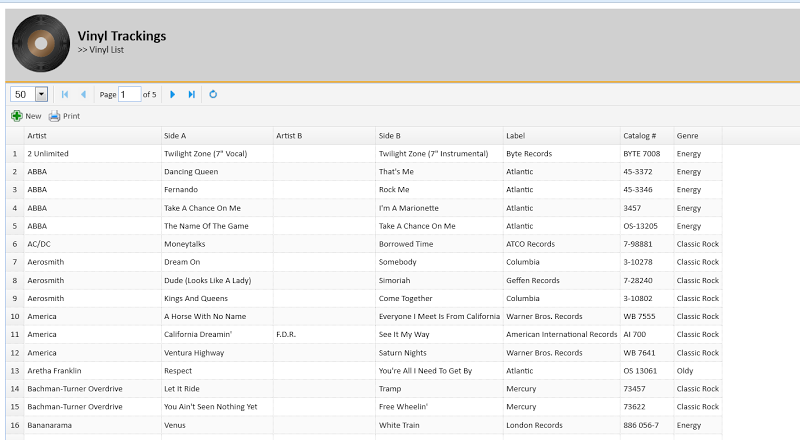
Image
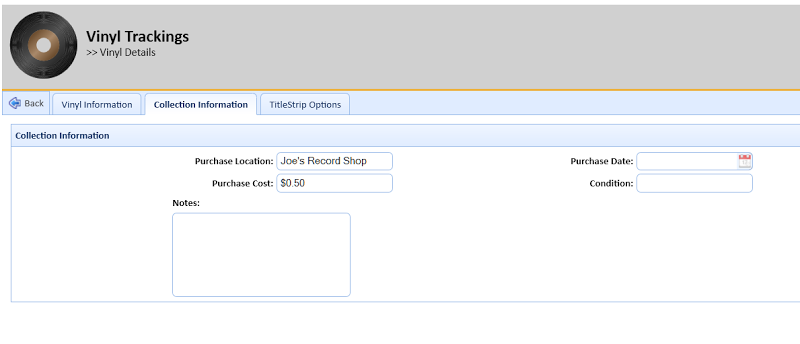
If you double-click on a record, you can pull up its details. The first two tabs contin information about the record, and any additional collection information:
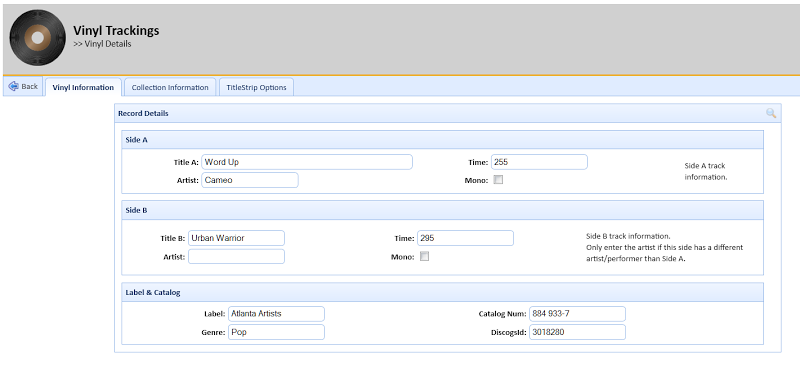
Image
Image

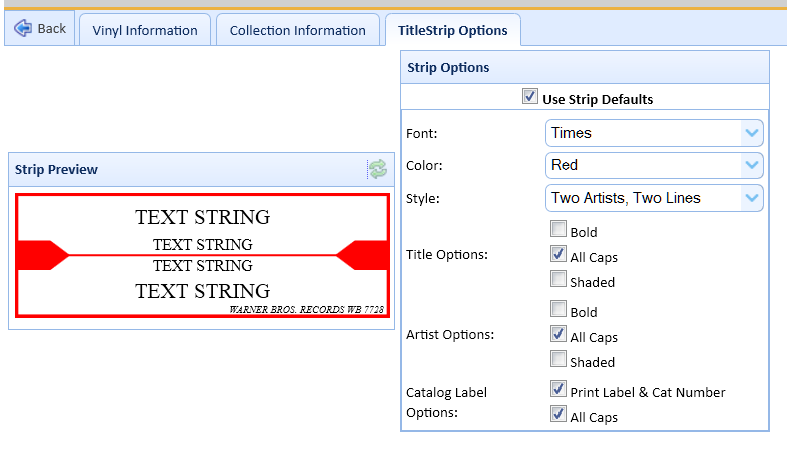
But the real reason I was doing this was so I could print out labels. So the last tab lets me define what the record's label will look like:
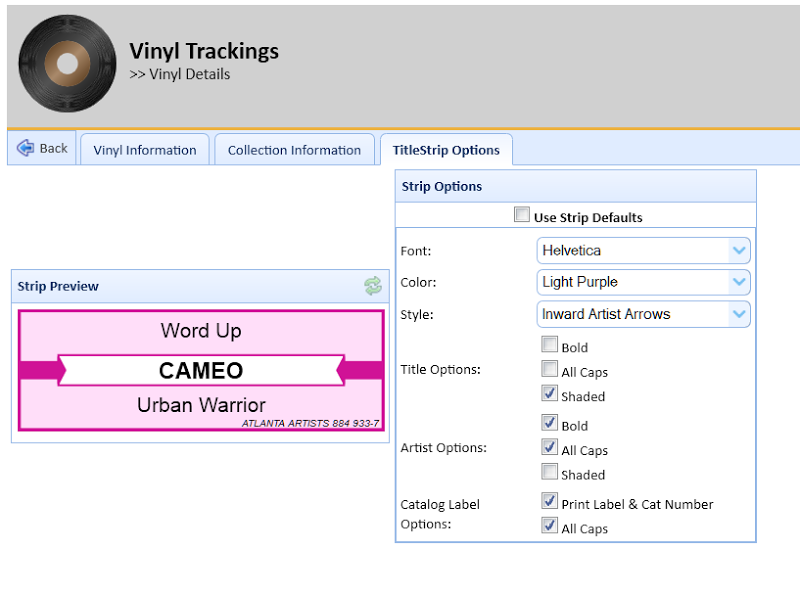
Image

While it's not noticeable, I put most of my work in the code that generates that titlestrip. It handles double-artists on the fly (either adding a " / " between the two, or making them two lines based on layout, see below), and will automatically shrink the font-size or word-wrap to two lines and shrink to make the song fit and not run outside the boundaries. I made a lot of colors (some I ripped from online strip generators, one or two I made myself), and even added images to the selection boxes:
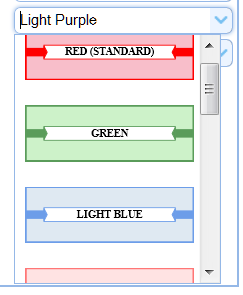
Image

Code was added to generate selected records and add them to a page (with cut-lines! :D), then combine all the pages into a PDF. That was about it, until I realized that some of my records I had entered incorrectly - Side A was Side B, and vice-versa. So, easy fix - I added a couple dialogs to allow me to query Discogs to query for matching entries, and import information if you want:
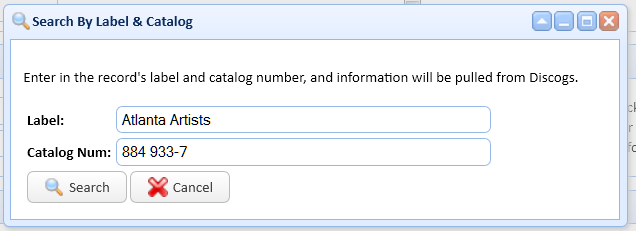
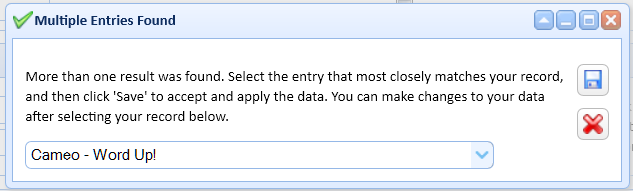
Image
Image

At this point, I was finished .. with extras.. of everything I had wanted to do. However, I kept going, for some crazy reason. I started working on adding user support (i.e. support multiple users). I stopped mid-way, since I highly doubt anyone would be using this, other than myself. :mrgreen:

But wanted to share, since I got the darn text centered:
Image
That I essentially spent far, FAR too long doing something that.. really didn't need to be done. :D
I'm strange.. I like 'Rock And Roll (Part 1) from Gary Glitter more than the more common (Part 2)..


eddie
Senior Member
Posts: 118
Joined: Tue Dec 30, 2014 8:03 pm
Location: Sharon SC USA

Re: Titlestrips..

by eddie » Thu Jun 18, 2015 2:10 pm

Someone smarter than me should write a program for this forum that uses a saved online database to make title strips. You start typing the title and it searches as you type. When correct title pops up you click it and rest of info is filled in. If title doesn't exist, your new info is stored in the database for others to use. Would be a good website idea.

User avatar

Topic author
foxtrotxray
Senior Member
Posts: 117
Joined: Sat May 16, 2015 8:49 pm
Location: West Virginia, US

Re: Titlestrips..

by foxtrotxray » Thu Jun 18, 2015 4:26 pm

eddie wrote:Someone smarter than me should write a program for this forum that uses a saved online database to make title strips. You start typing the title and it searches as you type. When correct title pops up you click it and rest of info is filled in. If title doesn't exist, your new info is stored in the database for others to use. Would be a good website idea.

Wouldn't be that hard to do. My code is written for IIS/.NET, but the SVG part of it is just that.. SVG/XML, so generating an 'image out' wouldn't be that difficult to port over to PHP (the code this forum runs on..)

Now I'm REALLY anxious to get the juke back together, so I can actually USE my little webpages and generate titlestrips. :D
I'm strange.. I like 'Rock And Roll (Part 1) from Gary Glitter more than the more common (Part 2)..


eddie
Senior Member
Posts: 118
Joined: Tue Dec 30, 2014 8:03 pm
Location: Sharon SC USA

Re: Titlestrips..

by eddie » Thu Jun 18, 2015 4:49 pm

If you had hundreds or thousands using the website, you could build a huge database in no time.

User avatar

DoghouseRiley
Senior Member
Posts: 630
Joined: Thu Apr 16, 2009 9:48 pm
Location: North-West England

Re: Titlestrips..

by DoghouseRiley » Thu Jun 18, 2015 5:24 pm

I've no problems with the title strip feature at Mike's Arcade.

https://www.mikesarcade.com/arcade/titlestrips.html

After a while you get use to its limitations, which are very few.

With long titles I always put two or three extra spaces at each end, but you have to be aware that the font may decrease in size if the title then is too long.

With a different artist on the "B side" I also put in a couple of extra spaces after the first name and before the second name. This give a bit of a gap either side of the "slash."

In any event, you can go back in and centre any up you don't think are quite right in the preview stage.

A minor inconvenience for a free site.

______________________________________________________________________________________________________

I don't mind if you don't like my manners, I don't like them myself, they're pretty bad, I grieve over them on long winter evenings.


Canadian
Junior Member
Posts: 20
Joined: Tue Sep 17, 2013 6:04 am
Location: Grande Prairie Alberta Canada

Re: Titlestrips..

by Canadian » Sat Jun 20, 2015 12:02 am

I bought this one from Dennis Downing. Its is very reasonable.
http://www.jukestrips.com/
The only thing I changed was I used Microsoft excel to read the database into it then I can rearrange
per artist or alphabetical and keep a record of it.


SteveFury
Regular Member
Posts: 99
Joined: Wed Aug 21, 2013 7:21 am
Location: Atlanta,Ga,USA

Re: Titlestrips..

by SteveFury » Wed Jul 01, 2015 12:45 am

I just use GIMP, an open source free alternative to Photoshop.

I made a template of blank title strips, printed them to ensure they are the right size. That template is used to make all my strips. I just add the text and print it.

User avatar

Topic author
foxtrotxray
Senior Member
Posts: 117
Joined: Sat May 16, 2015 8:49 pm
Location: West Virginia, US

Re: Titlestrips..

by foxtrotxray » Wed Jul 01, 2015 4:08 pm

Canadian wrote:I bought this one from Dennis Downing. Its is very reasonable.
http://www.jukestrips.com/
The only thing I changed was I used Microsoft excel to read the database into it then I can rearrange
per artist or alphabetical and keep a record of it.

I heard of his software, but since I'm a DIY kind of guy (and I already HAD a database of my vinyls), I decided to do it myself. :mrgreen:
SteveFury wrote:I just use GIMP, an open source free alternative to Photoshop.

I made a template of blank title strips, printed them to ensure they are the right size. That template is used to make all my strips. I just add the text and print it.

I'm not graphically inclined, admittedly - so when I went about this, making an SVG of the titlestrips (with the various options) was far easier for me. (And, one of the ideas I had toyed with was that since I already have a database of the vinyls, it wouldn't be that hard to add tables and specify/keep track of which ones are in the Juke. ..And then, taking it one step further, have the application auto-generate lineups in the juke by sorting, splitting genres, etc.) ..But I never made it that far. Mainly because, well, since I'd be the only one using it, the effort wasn't worth the payoff. :)
I'm strange.. I like 'Rock And Roll (Part 1) from Gary Glitter more than the more common (Part 2)..

Who is online

Users browsing this forum: No registered users and 6 guests

It is currently Thu Oct 06, 2016 7:32 am