I have recently purchased a Rowe R-91 Jukebox. It was working fine and is programmed for continuous play (255). When I switched to service mode and changed records, when moving back to the on position the display of 255 is no longer there. In programming mode the settings are all correct. How do I get the panel to operate the same as before? It is blank and if I type numbers it fills in the number of selections field with whatever I type in.
When I switch between on and service "er21" displays.

ROWE R-91 JUKEBOX - ISSUES WITH INPUT SELECTION
Q&A about all types of jukeboxes: Wurlitzer, Seeburg, Rock-Ola, AMI, and more.
-
Ron Rich
- Forum Moderator
- Posts: 8193
- Joined: Sun May 06, 2007 11:31 pm
- Location: Millbrae (San Francisco area)CA, USA
Replace the battery, default CCC, and re-program. That should solve you problem.If not, you need to rebuild the CCC. Ron Rich
Ron's suggestion is the most likely, however the service switch itself was a known cause for oddball problems.
The switch is a multi-section and the extremely low current through it combined with the dirty atmosphere these machines existed in caused problems.
I had four machines of this era on location and even after just a few years of service, these switches became intermittent. A little contact cleaner will fix it.....for a while.
Rob/NYC
The switch is a multi-section and the extremely low current through it combined with the dirty atmosphere these machines existed in caused problems.
I had four machines of this era on location and even after just a few years of service, these switches became intermittent. A little contact cleaner will fix it.....for a while.
Rob/NYC
"If we believe absurdities, we shall commit atrocities" -- Voltaire
-
Ron Rich
- Forum Moderator
- Posts: 8193
- Joined: Sun May 06, 2007 11:31 pm
- Location: Millbrae (San Francisco area)CA, USA
Guy's,
In this case, I don't think, it's a switch problem--but---DeoxIT-5, spray, works wonders on all "Switchcraft" brand, type switches, IF you follow the directions on the can ! --These are the"gen-u-whine thing" ! Ron Rich
In this case, I don't think, it's a switch problem--but---DeoxIT-5, spray, works wonders on all "Switchcraft" brand, type switches, IF you follow the directions on the can ! --These are the"gen-u-whine thing" ! Ron Rich
-
ueberrot
Topic author - Junior Member
- Posts: 7
- Joined: Sun May 04, 2014 12:11 am
- Location: East Lansing, Michigan, USA
I will try the contact spray first. 
By service switch, I'm assuming the black box switch on the left hand inside of the jukebox that can either be in "off", "service" or "on" position.
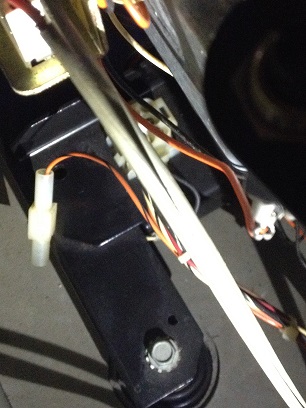
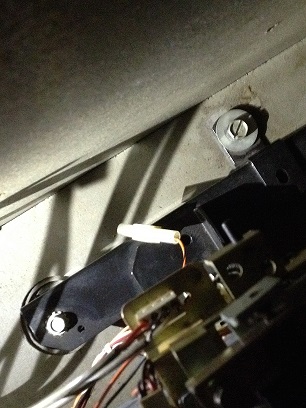
Also, I have a plug that is not connected to anything and can't figure out where it goes. It is in the area to the left hand side around the base of the turntable/record mechanism. See attached photos.
By service switch, I'm assuming the black box switch on the left hand inside of the jukebox that can either be in "off", "service" or "on" position.
Also, I have a plug that is not connected to anything and can't figure out where it goes. It is in the area to the left hand side around the base of the turntable/record mechanism. See attached photos.
- Attachments
-
- Jukebox2.jpg (57.43 KiB) Viewed 983 times
-
- Jukebox1.jpg (59.28 KiB) Viewed 983 times
-
 VA Bigdog
- Regular Member
- Posts: 56
- Joined: Fri Mar 07, 2014 2:29 am
- Location: Woodbridge, Virginia, USA
That wire (Orange/Black) is the Mute signal line. One end should be connected to the CCC and the other end to the mute plug on the amplifier.
I have an R-90 and on mine it's pin 17 on the P6 CCC connector connecting to pin 4 on the mute plug. I have no idea if it's the same for the R-91, so check your manual.
Nelson
I have an R-90 and on mine it's pin 17 on the P6 CCC connector connecting to pin 4 on the mute plug. I have no idea if it's the same for the R-91, so check your manual.
Nelson
-
ueberrot
Topic author - Junior Member
- Posts: 7
- Joined: Sun May 04, 2014 12:11 am
- Location: East Lansing, Michigan, USA
The plug is not even remotely long enough to run to the amplifier - it has to go elsewhere.
Hello ueberrot,
Sorry you did not give your name!
The connector you have pictured goes to the mechanism socketon the side of the mechanism, the loom that goes from P205 on the mechanism control has a cable that fits into the loose connection. The loom from p205 goes to the CCC P6 if memory serves me correctly.
Error 21 relates to the CCC thinking that keyboard switch 8 in always closed.
This can be down to a shorted switch, short on the loom between the keyboard & display or a short in the CCC to display loom a defective display digital display or even a defective CCC.
Regards
Alan
Alan Hood
ami-man
UK
Sorry you did not give your name!
The connector you have pictured goes to the mechanism socketon the side of the mechanism, the loom that goes from P205 on the mechanism control has a cable that fits into the loose connection. The loom from p205 goes to the CCC P6 if memory serves me correctly.
Error 21 relates to the CCC thinking that keyboard switch 8 in always closed.
This can be down to a shorted switch, short on the loom between the keyboard & display or a short in the CCC to display loom a defective display digital display or even a defective CCC.
Regards
Alan
Alan Hood
ami-man
UK
-
VA Bigdog
- Regular Member
- Posts: 56
- Joined: Fri Mar 07, 2014 2:29 am
- Location: Woodbridge, Virginia, USA
I was giving you the terminations on either end of the wire so that you could follow it from both sides.
As Alan stated, there should be a single plug at the mech to match the dangling end you currently have.
Nelson
As Alan stated, there should be a single plug at the mech to match the dangling end you currently have.
Nelson
-
ueberrot
Topic author - Junior Member
- Posts: 7
- Joined: Sun May 04, 2014 12:11 am
- Location: East Lansing, Michigan, USA
Does anyone have a process of which I can follow to determine which of the below potential problem(s) I am experiencing (ie. a process of elimination steps)? Tried the contact cleaner which didn't help.
Error 21 relates to the CCC thinking that keyboard switch 8 in always closed.
This can be down to a shorted switch, short on the loom between the keyboard & display or a short in the CCC to display loom a defective display digital display or even a defective CCC.
Error 21 relates to the CCC thinking that keyboard switch 8 in always closed.
This can be down to a shorted switch, short on the loom between the keyboard & display or a short in the CCC to display loom a defective display digital display or even a defective CCC.
-
Ron Rich
- Forum Moderator
- Posts: 8193
- Joined: Sun May 06, 2007 11:31 pm
- Location: Millbrae (San Francisco area)CA, USA
Other then to un-plug the keyboard, and swapping in, a known good CCC, there is no way to determine where that problem is--as far as know-- I have found that problem is usually in the display board-- Ron Rich
-
ueberrot
Topic author - Junior Member
- Posts: 7
- Joined: Sun May 04, 2014 12:11 am
- Location: East Lansing, Michigan, USA
Replaced the CCC and it works great.
Next issue is the left speaker sound is very distorted - the right is just fine. What do I need to do to fix the left speaker?
Steve
Next issue is the left speaker sound is very distorted - the right is just fine. What do I need to do to fix the left speaker?
Steve
Hi Steve,
More than likely one side of the amplifier is faulty, you can test this by hooking up a pair of extension speakers to the ouput package.
Regards
Alan
More than likely one side of the amplifier is faulty, you can test this by hooking up a pair of extension speakers to the ouput package.
Regards
Alan
-
Ron Rich
- Forum Moderator
- Posts: 8193
- Joined: Sun May 06, 2007 11:31 pm
- Location: Millbrae (San Francisco area)CA, USA
Steve,
Might be easier to swap internal speakers to test ?? My bet would be the same as Alan's ( I do rebuild those amps--PM me if you wish). Ron Rich
Might be easier to swap internal speakers to test ?? My bet would be the same as Alan's ( I do rebuild those amps--PM me if you wish). Ron Rich
-
ueberrot
Topic author - Junior Member
- Posts: 7
- Joined: Sun May 04, 2014 12:11 am
- Location: East Lansing, Michigan, USA
In an earlier post, I included a picture of a plug that a couple folks referred to as a mute plug. I still haven't found where to plug that in on the mechanism. Would that be impacting the speaker sound? And does anyone have any more info as to exactly where to plug this in on the mechanism?
Steve
Steve
Who is online
Users browsing this forum: ds100h, Google Adsense [Bot] and 11 guests
It is currently Thu Oct 06, 2016 6:32 am