Yes--that would indicate that either you do not have established credit, or that the carry-over/motor start contacts are not making well--
Ron Rich

trying to resurrect a Seeburg ED 3WA 22
Q&A about all types of jukeboxes: Wurlitzer, Seeburg, Rock-Ola, AMI, and more.
-
rockola503
Topic author - Junior Member
- Posts: 19
- Joined: Sun Feb 09, 2014 9:28 pm
- Location: Issy, IDF, France
I assume credit is established because "light" is on, by moving backward the credit wheel.
To be sure, what I mean by "wiper plate" is what is called "motor carry-over segment" on figure 14.
Do I need to remove something to check for "carry-over/motor start contacts", or everything is accessible ?
Not sure where they are located ?
To be sure, what I mean by "wiper plate" is what is called "motor carry-over segment" on figure 14.
Do I need to remove something to check for "carry-over/motor start contacts", or everything is accessible ?
Not sure where they are located ?
-
Ron Rich
- Forum Moderator
- Posts: 8193
- Joined: Sun May 06, 2007 11:31 pm
- Location: Millbrae (San Francisco area)CA, USA
Which "light" is on ??
Motor carry over "segment" is not the same as the motor start / carry over "switch"--see the service manual for switch location/adjustment procedure.
Ron Rich
Motor carry over "segment" is not the same as the motor start / carry over "switch"--see the service manual for switch location/adjustment procedure.
Ron Rich
-
rockola503
Topic author - Junior Member
- Posts: 19
- Joined: Sun Feb 09, 2014 9:28 pm
- Location: Issy, IDF, France
Left side light is on.
"check for motor start / carry over "switch" : you mean the contact behind the letter buttons ?
Another photo of wiper back, what's your opinion ?
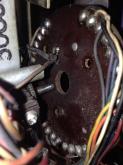
"check for motor start / carry over "switch" : you mean the contact behind the letter buttons ?
Another photo of wiper back, what's your opinion ?

-
Ron Rich
- Forum Moderator
- Posts: 8193
- Joined: Sun May 06, 2007 11:31 pm
- Location: Millbrae (San Francisco area)CA, USA
Which one is the "left side light"--what does the glass say ??
NO--do you have the manual--too difficult to put it into words, as it is already in the manual !
What does the disk rear have to do with this, as long as none of the wires are broken off ?
Ron Rich
NO--do you have the manual--too difficult to put it into words, as it is already in the manual !
What does the disk rear have to do with this, as long as none of the wires are broken off ?
Ron Rich
Left side light is on.
"check for motor start / carry over "switch" : you mean the contact behind the letter buttons ?
Another photo of wiper back, what's your opinion ?
Serge, sorry I haven't had the time to help you here. I've had a rush of work and entertaining to do...just when I though it was over,
Let's start with making sure things are 'normalled".
-Put the contact wafer back on and install the wiper blade with one set screw just tight enough to allow you to turn the wiper and gears backward 9counter-clockwise) to the point where they stop. Don not attempt to force it beyond this point. then loosen the wiper blade and set it so that it forms a "V" as shown here;
http://s1192.photobucket.com/user/Rob-N ... rt=2&o=176 Tighten the set screws to lock it.

-Now turn it clockwise till it reaches the credit position where the buttons lock-in when pressed.
-Check the leaf switches behind the wafer. Those with a blade in the center of two shorter blades should not be touching either of the shorter blades.
-Check that the taper pins on the "Singles" & "EP" board are all at "Singles".
Press two buttons. If the motor doesn't start, turn the white credit wheel back and fourth a bit to see if you are on a dead spot. It should take off and complete a cycle.
Note that the "rest" position is different depending on if there is credit remaining, or not.
These boxes can be tricky because of their complex wiring and the fact that there are at least 4 different permutations and not all are documented adequately..many also got hacked in various ways over the years. Nonetheless, it should be fairly easy to get basic operation again.
Start by getting things back together and we'll see from there.
Rob-nyc
"If we believe absurdities, we shall commit atrocities" -- Voltaire
Who is online
Users browsing this forum: Bing [Bot] and 6 guests
It is currently Thu Oct 06, 2016 1:39 pm