Page 1 of 1
Question about rowe cd100j (saturn 2) selections
Posted: Sun May 03, 2015 2:15 am
by hirdlej
I have a Rowe AMI CD100J cd jukebox that I have a question about. Is it possible to program the computer to clear all selections when the machine is powered off so that when I start it up again, I don't have to listen to the 100 songs that were queued up? I realize if I go into service mode, and do 8-3-1-3 and hit the "P" button it will clear all selections. I'm just wondering if there's an option to have it clear selections when powered off so I don't have to open the machine up and go into service mode. If this is possible, please let me know. Thanks in advance guys!
Re: Question about rowe cd100j (saturn 2) selections
Posted: Sun May 03, 2015 2:36 am
by Ron Rich
Going from my great, but not to long memory--yes, this is possible--look in the "options" section--if not there, look in the "More options" section of the manual-- Ron Rich
Re: Question about rowe cd100j (saturn 2) selections
Posted: Sun May 03, 2015 6:17 am
by hirdlej
Hey Ron, I pulled out the quick reference guide tonight after reading your post. I must have looked at the guide 10 times this afternoon, each time gazing right over the option. I believe this is what I need to enable/disable in service mode. Thanks for pointing me the right direction.

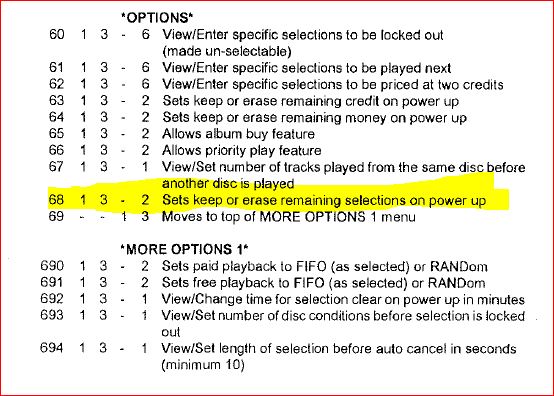
- Capture.JPG (69.29 KiB) Viewed 364 times
Re: Question about rowe cd100j (saturn 2) selections
Posted: Sun May 03, 2015 7:11 am
by hirdlej
Alright, I just went to "enable" this and I got a different message than what's shown on the quick navigation map. Instead of "keep or erase remaining selections on power-up" it was labeled "erase selections after 4 hours". Is this a printing error I wonder or does my screen display a different message than what's printed in the manual?
Re: Question about rowe cd100j (saturn 2) selections
Posted: Sun May 03, 2015 5:18 pm
by Ron Rich
As I have written before--"Rowe Docs" are full of errors--I never used the "quick guides" as they were wrong too many times--
Check the Service Manual, or just run thru the options on the keyboard, and you should find it. Ron Rich