Hello all! I'm new to this forum, but I hope to find some good information, and on occasion some good advice in the future. I recently inherited a mid-1960s (I assume) Magnavox Astro-Sonic Record Player, and I have just begun the restoration process. As I'm sure there are numerous issues with this record player, any advice is welcome. Here are the issues I have run into so far:
When I turn the record player on or on automatic, I can hear movement, but the platter does not spin
At different volume levels either one or the other speaker works, but usually not at the same time (I assume this is due to old wiring that should be replaced)
The only steps I have taken so far is to remove the backing, and vacuum out all of the cobwebs and dust.
Thanks to anyone in advance, and if anyone has tips on the best places to order parts that would be extremely helpful. The model number is 1RP657 for anyone who's interested.
I look forward to interacting with you all as I get to know this process! Thanks again!

Magnavox Astro-Sonic
Electrically amplified phonographs or radio/phonographs and related components (approx. 1928-1990).
Pictures would help. I don't have access to all the model numbers of the Magnavox line. Sounds like a turntable clean & lube is in order as well as the pots on the amp. Considering how old this is an amplifier recap will probably be needed also. Thom
Vinyl is disease which attacks that area of the brain desiring digital recordings. Once you catch it, you are cured.
-
Bobby Basham
- Senior Member
- Posts: 498
- Joined: Sat Aug 26, 2006 2:50 pm
- Location: Tucson, Arizona, USA
First of all, Welcome to the Forum!!!
There are a lot of great people here who can help. As far as the record player goes, it sounds as if the idler wheel is not engaging against the inside rim of the record platter. Remove that "C" type clamp on top of the platter, lift and remove, and take a look see. The linkage could be dirty not allowing the wheel to contact the motor shaft and the inside rim at the same time. If you turn it on (with platter removed), that wheel should push toward the motor shaft and sorta outward toward to contact the inside rim. It should be motor shaft-to-idler wheel-to inside rim.
As far as the volume control, dirty contacts. Rotate it back and forth several times to remove some of the dirt/grit until the static noise goes away, or you may have to remove the the receiver/amp and use a cleaner like Deoxit on those rotary controls It shouldn't be a wiring problem.
Best of luck to you and Welcome Again! Gotta love those Astro-Sonics. --BB
Bobby Basham
Tucson, Arizona
There are a lot of great people here who can help. As far as the record player goes, it sounds as if the idler wheel is not engaging against the inside rim of the record platter. Remove that "C" type clamp on top of the platter, lift and remove, and take a look see. The linkage could be dirty not allowing the wheel to contact the motor shaft and the inside rim at the same time. If you turn it on (with platter removed), that wheel should push toward the motor shaft and sorta outward toward to contact the inside rim. It should be motor shaft-to-idler wheel-to inside rim.
As far as the volume control, dirty contacts. Rotate it back and forth several times to remove some of the dirt/grit until the static noise goes away, or you may have to remove the the receiver/amp and use a cleaner like Deoxit on those rotary controls It shouldn't be a wiring problem.
Best of luck to you and Welcome Again! Gotta love those Astro-Sonics. --BB
Bobby Basham
Tucson, Arizona
Thanks for the help! I've tried to attach some pictures several times, but I keep getting an error. I'll keep trying so you guys can see it. I'll take a look at the turntable in next couple of days and let you know how it goes. Thanks again!
Matt
Matt
-
Joe_DS
- Forum Moderator
- Posts: 1056
- Joined: Thu Jun 08, 2006 4:23 pm
- Location: San Francisco, California, USA
agmattyb wrote:Thanks for the help! I've tried to attach some pictures several times, but I keep getting an error. I'll keep trying so you guys can see it. Matt
Hi Matt:
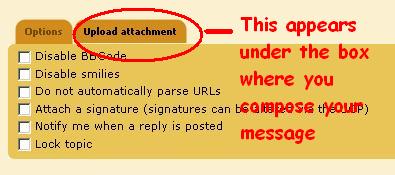
There should be no problem using the "Upload Attachment" tab at the bottom, providing the file is not too large -- say 600 x 700, and is saved in the standard JPG image format on your PC.
1 -- Click on "Upload Attachment" tab,
2 -- Click on Browse (You'll see a pop-up screen showing your PC's files)
3 -- Locate and Click on the folder that the file is stored in
4 -- Click on the file to highlight it
5 -- Click on the OPEN button (The pop-up screen will then disappear.)
6 -- Click on the "Add the File" button
7 -- On the next screen that appears, click on the "Place Inline" button
8 -- Click on the Preview or Submit Button.
I've attached the following using the above method as a test, to make sure it's working:
- uploadatachment.JPG (17.79 KiB) Viewed 1056 times
Who is online
Users browsing this forum: Baidu [Spider] and 1 guest
It is currently Thu Oct 06, 2016 5:45 pm
